
Historic Structure Survey Report Standards
Recent Changes/Notifications (May 6, 2026)
- May 6, 2026
- Created an alternative text tab for images vs. maps
- Created a tab for color and contrast
- April 29, 2026:
- Moved ADA Digital Compliance to its own section
- Added info about alternative text
- Added info about font
- Clarification about report and deliverables and what needs to be ADA compliant
- As of April 1, 2026, all reports for review will be required to meet ADA's New Rule on Accessibility of Web Content provided by State and Local Governments.
- All reports sent on or before March 31, 2026 that have not been accepted as final will be not be required to meet accessibility standards.
- Please see ADA Accessibility Compliance for more information.
Introduction
These standards are to be used for any Historic Structure Survey Reports (HSSR) submitted to the North Carolina State Historic Preservation Office (HPO) to fulfill the requirements for identification and evaluation of properties as part of the Section 106/110, or Environmental Review process.
HSSRs must fulfill these standards and provide the information necessary to fully evaluate the National Register status of properties within an undertaking’s Area of Potential Effects (APE). If a project is not undertaken within 5 years of a report, an update of the survey and findings may be required. If NCHPO has not requested a survey or evaluation, contact ER staff to determine if one is needed. All correspondence should reference the assigned HPO ER tracking number.
Archaeology survey reports must be submitted separately from HSSRs and follow Office of State Archaeology guidelines. For questions regarding archaeology surveys and reports, contact OSA.
Use this link for a list of uploaded HSSRs
Questions? Contact the Environmental Review Branch Staff
Expand the tabs below to learn more about the standards. Be sure to complete your deliverables checklist. Download printable versions of our Checklist and HSSR Standards below.
HSSR Requirements
Initial submission requires the review of the digital (pdf) report only. The items listed below will be requested once the HSSR has been accepted as final. All deliverables are required for final report submissions. A final acceptance letter and determination of effect will not be issued until all deliverables have been received.
Digital Copy
Provide digital deliverables on a single thumb/flash drive, compact disc (CD), requested ShareFile link, or other pre-approved file transfer link. Drive/CD must be new (unused) and cannot contain embedded security software. Separate digital deliverables into their own folders. A template with sample files, folders, and pdf instructions - can be downloaded from the content listed at the bottom of this webpage.
- Full copy of report in PDF format
- GIS Data/Databases
- Survey Site Database
- Spreadsheet (Excel or similar) of all resources and determinations if number of resources intensively surveyed exceeds five (5) – Field required are “SSN”, “Resource Name”, “Pre-Survey Determination”, “Survey Determination”, and “If Eligible, under which Criteria?”
- Photographs - JPEG preferred. Files should be labeled according to NCHPO Policy and organized into subfolders by property, using the SSN as the folder label
- Photo proof sheets
Hard Copy
Be sure to use the address appropriate to your chosen delivery method, as submissions may become delayed or lost if addressed incorrectly.
- Transmittal Letter
- Full copy of report - Unbound; 3-whole punched preferred
- Site Files (with or without envelopes as required) - must contain printed survey site forms, photo proof sheets, and copies of the report title page, management summary, and the pages of the report dealing with the individual resource/National Register evaluation
| Delivery Method | Point of Contact & Address |
|---|---|
| By US Postal Service: | Environmental Review Branch State Historic Preservation Office 4617 Mail Service Center Raleigh, NC 27699-4617 |
| By FedEx, UPS, or courier: | Environmental Review Branch State Historic Preservation Office 109 East Jones Street, Room 255 Raleigh, NC 27601 |
A transmittal letter must accompany the historic architecture survey report, revised report, or addendum submittal.
ER Tracking Number and Project Name
- All incoming reports should be associated with a project that has already been submitted for environmental review and has received an HPO ER Tracking Number, for example, ER 19-1856.
- If the project does not have an ER Tracking number it must be submitted to the Environmental Review branch before a survey report will be accepted. Exemptions to this rule are NCDOT and select federal evaluations.
- To submit a project for Environmental Review, follow the instructions at the Project Review Checklist page.
Contact Information
- Your complete address, email, and telephone number.
- The project applicant's name (point of contact), email, and telephone number. Depending on the client, the applicant may prefer to submit the report themselves.
Submission Content
- Brief description of the project and survey report.
- List of the deliverables included.
For HSSR submission assistance, contact the Environmental Review inbox at environmental.review@dncr.nc.gov.
Initial Review Requirement: digital copy (PDF only) of the survey report must be submitted for review and comment. Once accepted, a submission of the final draft is require; one hard copy (unbound) and one digital copy (pdf).
Cover
- The report cover should include the name of the project, its location, author(s), and date.
Management Summary/Introduction
- The project or purpose of the report should be clearly defined.
- A map of the APE (see mapping requirements) and description of the area should be provided.
- Provide a table that lists each intensively-surveyed property in the report. Table headings must include: Survey Site Number (SSN), Property Name, Evaluation (NR/DOE status) and Criteria for eligibility. In addition to including this information within the report, for reports with more than five (5) intensely surveyed resources you must also provide a separate spreadsheet (Excel or similar) as one of the digital deliverables. SSN's should be two (2) letters followed by four (4) numbers with no space between.
- The HPO prefers that effects not be included in the survey report. Consult with ER Branch staff prior to including effects in the report.
- If directed by the agency/client to include effects of the undertaking in the report, include the effect for each listed or eligible property on the table described above.
Historic background/Context
- Should include time periods and information relevant to the area and types of properties being surveyed.
- At a minimum architectural context at the county level should be provided. Depending on the APE, additional more localized context may be warranted.
- Architectural context will help to strengthen eligibility evaluations. Comparable properties, which are required, can be discussed in this section and referred back to in later property evaluation/assessments.
- Consult the Practical Guide for Recording Historic Resources for guidance on expectations of survey work conducted in North Carolina.
Property Evaluations/Assessments
- Any property 50 years old or older within the APE (typically a 0.5 mile radius unless otherwise set by FCC for cell towers or determined through consultation with HPO) should be surveyed, assessed, and its eligibility for listing on the National Register of Historic Places evaluated.
- Evaluations must be supported with discussion of no less than 2-3 comparable properties (where feasible).
- Based on property type, comparable properties should be chosen from the local level first, expanded to county if needed; and, finally, adjacent counties or to the region, if finding comps proves particularly difficult. See photographs section for comparable photo instructions. The most helpful comps are ones already listed on the NRHP, determined eligible for listing (DOE), on the State Study List (SL), or designated in some way as historic.
- The use of nearby, and local comparables, including previously unrecorded or Survey Only resources, is acceptable and may be necessary to establish a strong foundation for the evaluation argument. While not necessarily prime examples of their type they help build context and show patterns.
- Assessment Template Coming Soon!
For APE or Report Text/Body assistance, contact the Environmental Review inbox at environmental.review@dncr.nc.gov to reach the project reviewer.
GIS data should be created for all project reports and submitted in a digital database format.
Shapefiles
- An Esri geodatabase or (s) is preferred, although other commonly used geographic vector data file types – such as KML and DXF – are acceptable.
- GIS data should be included for every individually surveyed resource (as points) and every surveyed district (as polygons) - regardless of whether a Determination of Eligibility is made for them; boundaries of properties recommended as eligible (as polygons); and the APE (as a polygon).
- HPO prefers that GIS data be created using the WGS 1984 coordinate system or projected to the NAD 1983 North Carolina State Plane coordinate system.
- Those without the ability to create geospatial data (via GIS software, Google Earth, or the like) should contact the HPO for an alternative method of satisfying the spatial data requirement.
Attribute Tables
- GIS attribute tables for surveyed resources and districts need not contain every field identified within the Microsoft Access Project Database (described below). However, the tables should, at a minimum, include a field containing the SSN to allow database linking.
- There are no field requirements for the APE attribute table.
HPO Data
- HPO will provide baseline historic resource GIS data (point and polygon locations for previously recorded individual resources and historic districts) for a given project area upon request.
- Monthly extractions of the HPO GIS datasets – for the entire state – are also available for download at any time from the HPO GIS Maps & Data webpage. Click the link to view our data download options. HPO GIS Data Downloads
For mapping assistance, contact Andrew Edmonds at andrew.edmonds@dncr.nc.gov.
A digital copy of the updated Survey Database data must be submitted with the final report. A hard copy of each of Survey Site File documentation created or updated during the survey must be printed from the completed database and report. The survey site files that must be submitted for all intensely surveyed properties are a combination of the: printed survey site forms, photo proof sheets, and copies of the report title page, management summary, and the pages of the report dealing with the individual resource that should contain the National Register evaluation section.
Survey Database
- Consultants for projects for which there are previously recorded properties within the APE should request a project database which includes existing database records for those properties. The consultant will update and populate existing records as well as create new records for newly recorded properties.
- Consultants for projects with no previously recorded properties and only a few newly recorded properties may use the empty, generic Project Survey Database.
- If the APE has no previously recorded properties but includes many newly recorded properties, the consultant may request a customized project database with default values for county, town, quad, road names, and other fields that may facilitate data entry.
- The populated database MUST be submitted with the report and include every property covered in the report.
- Instructions for data entry can be found in the How to Populate the HPO Historic Property Data Entry Form manual. At a minimum, database records shall include:
- The survey site number (SSN) provided by the HPO.
- Property Name (John Q. Public House, XYZ Company Building, Sweet Hope Baptist Church, etc.). If a specific name is not known, the generic property type is an acceptable alternative: House, Commercial Building, Church, Barn, etc.
- Street address or location
- A construction date or circa date (date field) and brief description (narrative summary field).
- The “Actions” record should be completed for all properties with author’s name, month and year, and project name. Project databases customized by the HPO will include this information (except month) as default values in the Actions record.
Survey Files
- Survey Files consist of a Site Form, or Property Summary Report, from the database for every intensely surveyed property, along with the digital photo proof sheet, management summary, and portions of the report covering the resource. Multiple reports can be printed at one time from the Reports section of the database menu.
- Hard Copies of these deliverables must be single-sided and should NEVER be fastened together using staples or bound in the report unless expressly instructed to do so by HPO ER staff.
- For newly recorded resources, Survey Site Files should be assembled and placed into individual 9 inch x 12 inch white booklet envelopes (opening on the long side) with a plain white label affixed to the upper left corner. Preferred label size is 1 1/8 inch x 3 1/4 inch and should be no larger than 1 1/4 inch x 3 1/4 inch. Labels should be formatted as follows; examples can be viewed on Pages 46-48 of the Survey/NR Branch Architectural Survey Manual.

- For previously recorded resources, a Survey Site File envelope already exists and is not a required deliverable. Consultants should provide the previously mentioned contents for a complete file and collate each resource's documentation using a paperclip. Do not use staples.
For Survey Database assistance, contact Andrew Edmonds at andrew.edmonds@dncr.nc.gov.
Survey Site numbers (SSNs) must be assigned to ALL intensely surveyed properties in the report and used in the submitted database. When referencing SSNs, use the standard convention, two (2) letter county abbreviation and four (4) numeral property number. Include leading zero(s), such as WA0003, CD1589, or PT0258 - but no spaces.
- To request SSNs for newly recorded properties, submit a spreadsheet with property name, address, town or vicinity, pin ID, and author’s temporary ID number(s) to Chandrea Burch. Include a map of the identified properties with this request. Include any properties already assigned SSNs in the spreadsheet for reference.
- All districts or neighborhoods will be assigned an SSN; including expansions to existing districts.
- Properties moved from their originally recorded location require a new survey site number for the new location.
- SSNs cannot be changed without the prior approval of HPO’s Chandrea Burch. This is especially important if a draft report was previously submitted to HPO.
For SSN or file room assistance, contact Chandrea Burch at chandrea.burch@dncr.nc.gov.
General Photo and Proof Sheet Requirements
- Original photo files (JPEG) must be submitted for ALL properties included in the report.
- Photo file names should be named using the format described in HPO digital photo policy.
- Photo proof sheets must be submitted for ALL properties included in the report in both digital and hard copy formats.
- Print on bright white paper; no less than 24lb weight.
- Color or Black & White
- Minimum of 4 and a maximum of 9 images per resource per 8.5 x 11 inch sheet with no image smaller than 3 inches on it its longest side.
- Photo file names must be included either below or on the back on the corresponding photo proof.
Surveyed Structure Photos
- Photos used in the assessment of a structure should clearly show each elevation of the property, as well as any architectural elements or details that exhibit distinctive historic character.
- Outbuildings that may contribute to a property's significance must also be documented.
- If the consultant is unable to access the property, photographs taken from the public right-of-way are acceptable but only if they show enough detail to make an accurate evaluation. It must also be noted in the evaluation that the surveyor was unable to access the property and therefore could not take the HPO preferred photographs.
Comparable Properties Photos
- As outlined in the Report Text/Body section, comparable properties are required. Photos of these properties should be taken during survey.
- Some property types may have very few comparables, which may also be an unreasonable distance away from the APE for the surveyor to travel. In general, if a comparable property is more than a county away, or at some great distance, the surveyor is not required to physically visit and record the property. They are however still required to provide recent photographs of the property. This may include images found through online map street-views, realty websites, county tax records, and others. Source and date of the photograph must be included.
ADA Digital Compliance / Web Content Accessibility Guidelines (WCAG)
All reports submitted to our Office after March 31, 2026, must be in PDF format and meet ADA's New Rule on the Accessibility of Web Content and Mobile Apps Provided by State and Local Governments.
What Needs to Meet ADA Digital Accessibility
- The final report, in PDF, including appendices, correspondence related directly to the report (e.g. recommendations, concurrence), and cover letters.
- This is what is ultimately uploaded and accessible via our digital library or HPOWEB link.
What Does Not Need to Meet ADA Digital Accessibility (Subject to change as we move forward to fully digitize survey site files)
- Full Sized Photographs
- Contact/Proof Sheet
- Survey Database
- Site Forms
- List of resources and recommendations
To check for ADA Accessibility our office will be using the Adobe Acrobat "Prepare for accessibility" tool. After converting your report to PDF please take the following steps to audit your report:
- Select "All Tools"
- Select "Check for accessibility"
- Under "Checking Options" it should have "31 of 32 in all categories."
- Select "Start Checking"
- Resolve any issues and manual checks
- Repeat until there are no issues, errors, etc.
To save Microsoft Word Documents as PDFs and preserve accessibility:
- Instead of clicking Save as Adobe PDF, click Save as and then More Options.
- When a new window pops up, go to the Save as type dropdown menu and click PDF.
- Fill out the Title
- After PDF is selected, go to Options (which should come up after selecting the document type)
- Make sure Document structure tags for accessibility is checked.
- Click Save
A specific font is not mandated but for digital accessibility 12-point, san-serif fonts that are commonly open and available is preferred. In general, our office has adopted Arial and Helvetica for our own use in letters, emails, etc.
- Arial
- Calibri
- Helvetica
- Tahoma
- Verdana
Alternative Text for images needs to be 125 characters or fewer with spaces included and descriptive, not technical. In short, a person with no prior knowledge of architectural history should be able to pick out any photo in a line-up with the given alternative text. Focus on obvious material, color, stories, symmetry, etc., not technical descriptions such as style, roof type, massing, etc. Captions and the body of the report can have all of the expected technical information, i.e. historic resource name, SSN, elevation vs. oblique, etc.
Summary:
- 125 character limit (spaces include)
- Descriptive, plain and as simple as possible
- Write out numbers
- Not a copy-paste of the caption
- Active Voice and Present Tense
- Do not include "Photo of" or "Image of"
- Context Matters: What are you primarily trying to identify, is weather relevant? Vegetation? Are there objects that help distinguish it from other images within a document?
Examples:
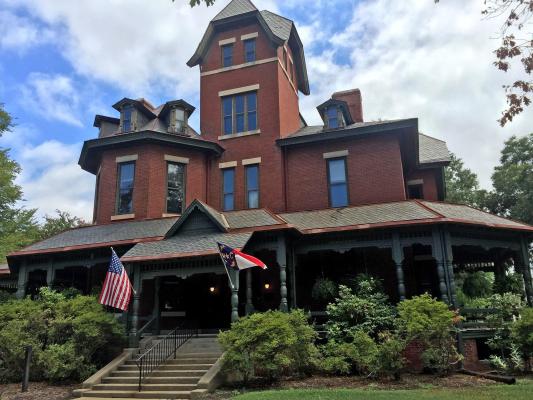
Alt Text: An asymmetrical red brick house with up to four stories and concrete steps leading to a wraparound porch. Bushes surround the porch.
Not Acceptable: A photo of the Hawkins-hartness House (WA0017), a two and a half Victorian with a striking and dominating presence.
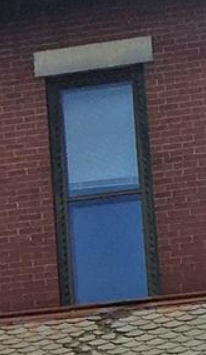
Alt Text: A window with a green frame and two panes of glass. It is surrounded by brick with a stone lentil.
Not Acceptable: A photo of a one over one double hung sash window surrounded by a sawtooth motif. The plate glass sash are accented by plain stone sills and lentils.
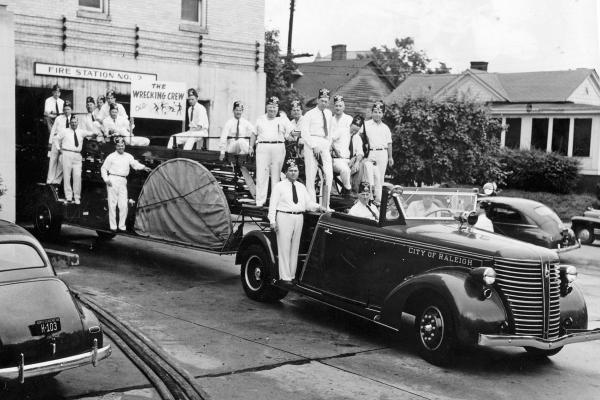
Alt Text: Seventeen men with matching outfits and hats standing on a fire truck parked at a brick fire station.
Not Acceptable: A black and white photo of the Shriner fire station company nicknamed "The Wrecking Crew" in the City of Raleigh, ca. 1940s-1950s.
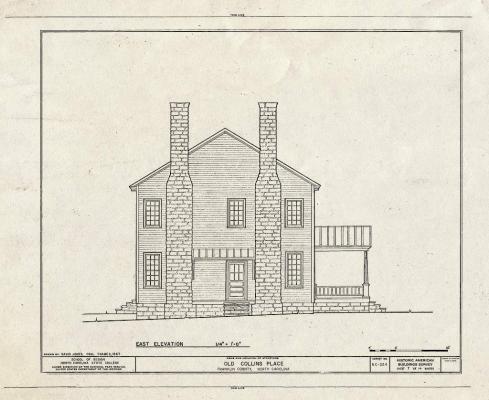
Alt Text: An architectural rendering of the side of a two story house with two brick chimneys and a porch.
Not Acceptable: A digital scan of a HABS drawing of the east elevation of the Old Collins Place
Alternative Text for maps should be 125 characters or fewer with spaces included, but can be as long as 250 characters. Context is key. What information are you trying to convey? The alternative text does not need to include the basemap type (Street, Aerial, Topographic) unless it is relevant to the information you're trying to convey. In general, the map caption and body of the report and cover the specifics.
Summary:
- 125 character limit (spaces include; encouraged). Up to 250 characters allowed.
- Plain and simple blurb about what information is the map trying to convey. Only mention the basemap type if it is relevant
- "A map of the park showing trails and points-of-interest"
- "A 2025 satellite image of the area showing tree coverage"
- "A map showing the project area in Wake County"
- "A color coded map showing the distribution of architectural styles type in the City of Raleigh"
- Body of text and captions can cover the specifics of the map figure in more detail
- Write out numbers, except for dates
- Not a copy-paste of the caption
- Active Voice and Present Tense
- Do include "Map of"
Examples:
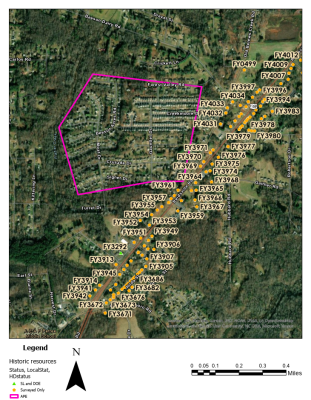
Alt Text: Map of the project area limits with a pink boundary and nearby recorded historical properties marked by orange pentagons and labeled with their site number.
Body of Text Example 1: HPOWEB was reviewed on May 6, 2026, identifying a total of 100 recorded properties within a one-mile radius of the project area (Figure 1).
Body of Text Example 2: Figure 1 shows the project area with a pink boundary and recorded historical properties marked by orange pentagons within a one mile-radius of the the project area
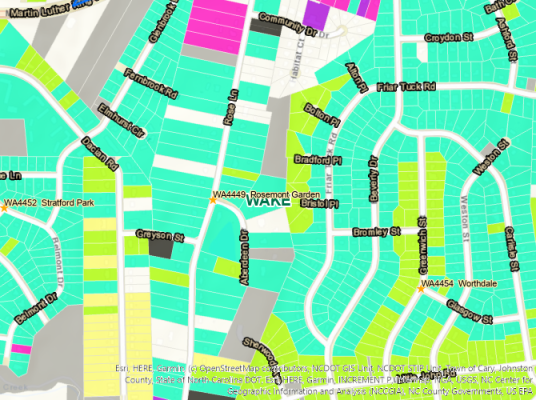
Alt Text: Map showing parcel boundaries color coded by the decade when a building was constructed
Body of Text: "Figure 2 highlights that southeastern Raleigh suburbs were built out during the 1950s, show in aquamarine, with infill throughout the 1960s to the present."
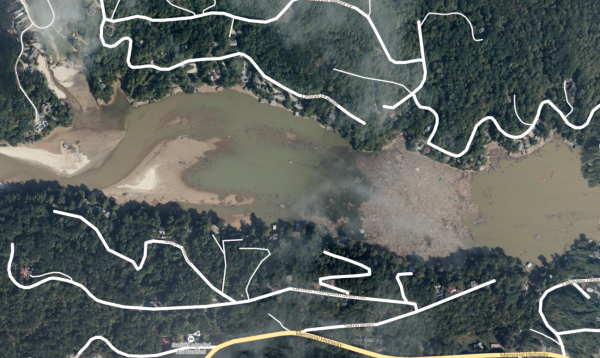
Alt Text: September 2024 satellite image of Hurricane Helene debris piled in Broad River at the mouth of Lake Lure, Rutherford County, North Carolina
Body of Text Example 2: In Western North Carolina the damage done by Hurricane Helene was devastating with over one million tons of silt, sand, and debris having been cleaned up since September 2024 (Figure 3)
Body of Text Example 2: Figure 3 is an example of how much debris flowed down river in western North Carolina, especially from the Broad River into Lake Lure.
Borders and Lines
Visual media such as images, photos, basemaps (street, aerial/satellite, topographic), etc., do not need to be converted to colorblind-friendly palettes, however, colors and symbols you add should be. The primary goal is contrast and distinguishable. Borders and lines should contrast well with each other as well as the base image it is on. For example, a project boundary with a heavily wooded aerial basemap, consider yellow or orange. Also consider line thickness and style, e.g. solid vs. dash vs. dot dash, or solid with letters such as Cut, Fill, and Easement lines seen on construction maps.
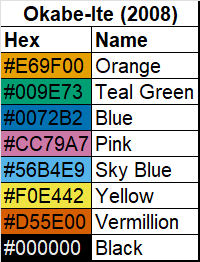
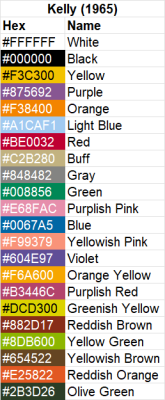
Our office does not endorse a specific color palette, but consider using Okabe-Ito (2008; Figure 1), Kelly's (1965; Figure 2) 22 contrasting colors, or similar, that have been wildly adapted in academic and scientific journals and presentations
Points
Much like the color contrast of borders and lines, points should have contrasting colors and distinct shapes/symbols, e.g. Circle, Triangle, Square, Pentagon, etc. Our HPOWEB follow these accessibility standards
Citations:
Masataka Okabe and Kei Ito. “Color Universal Design (CUD): How to Make Figures and Presentations That Are Friendly to Colorblind People.” 2008.
Kenneth L. Kelly. “A Universal Color Language.” Color Engineering 3, no. 16 (March–April 1965).
Documents
This page was last modified on 05/07/2026